Automated · Dynamic · Accurate · Quick
MikeTM Watch automates weekly journal analysis and identifies more infringements across all 45 classes: text, phonetic and now image based.
✓ Fully automated weekly watch
✓ All 45 classes in one click
✓ Client-ready PDF and Excel reports
30-minute walkthrough on your own portfolio. No setup required.

Infringements flagged this week
142
Ready to review
Trusted by 5,000+ lawyers at India's leading firms and enterprises
50%
Time saved on weekly journal analysis
90%
Reduced chance of missing infringements
4x
More infringements identified
Features
MikeTM Watch reads the trademark journal for you, applies your firm's filters, and hands back a report you can send without reformatting.
AI-Powered Journal Watch
The full journal is analysed automatically every week. No one on the team sifts through pages.
Customisable Filtering
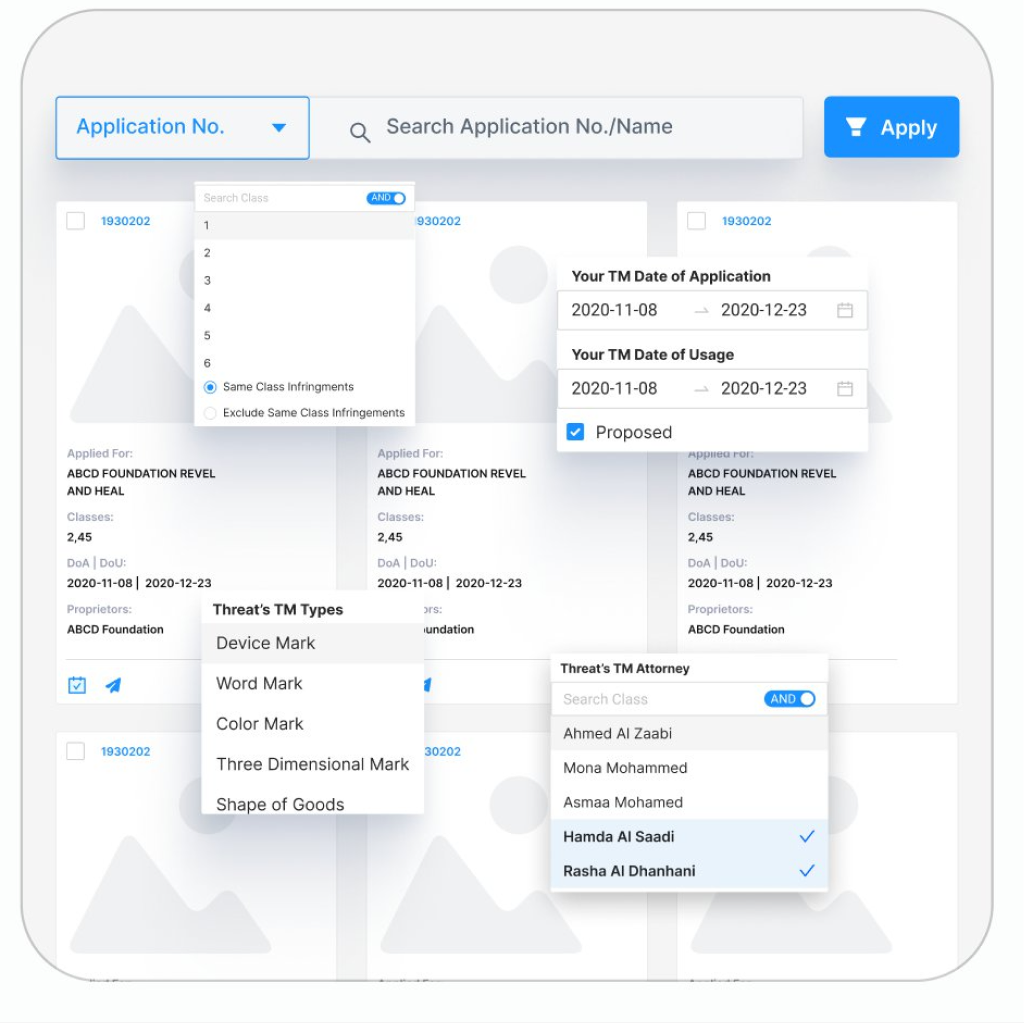
Filter by infringement type, class, date of application or usage, proprietor and opponent attorney.
Automated PDF and Excel Reports
Generate opposition reports in your own format and send them to clients from the dashboard.
All 45-Class Watch
Watch every class at once, or restrict to same-class threats, one click either way.
Image Watch
Device and logo marks are compared visually, catching threats a text search cannot see. Available as a paid add-on.
Trademark Protect
Identify similar marks filed with the IPO within 7 days, before journal publication.
Add-On
A device mark can copy your logo without copying a single letter of your name. Image Watch compares the artwork, not just the words.
✓ Visual similarity scoring on device, label and composite marks
✓ Available as an add-on to your MikeTM Watch subscription
✓ Set up alongside your existing journal watch
Ask About Image Watch in a DemoVisual Match Results
Class 2, 45 · Journal 2214
Your Mark 1930202 vs Threat Mark 2214887
92% match
86
Text and phonetic matches
56
Visual matches by Image Watch
142
Flagged for opposition
Illustrative dashboard state. Real figures depend on your portfolio.
How It Works
Set the watch up once. Every week the report is waiting for review.
1
Setup
Upload Your Portfolio
Import your marks in bulk or sync from MikeTM Manager. Onboarding is handled by our team.
2
Weekly
The Journal Is Analysed
Every new journal is read across all 45 classes for text, phonetic and visual similarity.
3
Review
Filter and Shortlist
Apply your firm's filters, compare marks side by side and mark the ones worth opposing.
4
Deliver
Send the Report
Export PDF or opposition report and email it from the dashboard.
Fully Automated Tool
"The MikeTM Watch tool is fully automated as it effortlessly captures potential infringements from Journals without needing to manually sift through each and every page."

Hemant Thadani
Partner, Crawford Bayley & Co.
Enables Better Research
"Mike IP Suite enables better research which allows us to strategize, therefore better saving our firm time and money meanwhile improving efficiency and resulting in better outcomes."
Praveen Agrawal
Why MikeTM Watch
Capability
Manual journal watch
MikeTM Watch
Image Comparison of Device Marks
✗
✓
Phonetic Infringement Detection
✗
✓
Customisation of Infringement Types
✗
✓
Identification Before Journal Publication
✗
✓
Unlimited Training Sessions
✗
✓
No One-Time Setup Cost
✗
✓
MikeIP Suite
Search, watch and manage the whole portfolio on one set of data.
Knowledge Centre
Latest Blogs
View All BlogsHow Automated Journal Watch Prevents Costly Infringements
A Practical Guide to Watching a Mark Across 45 Classes
Case Studies
View All CasesCutting Weekly Journal Review Time by Half
A research practice automates the watch across all 45 classes.
50%
Time saved
Catching the Infringements a Manual Watch Missed
MikeTM Lens surfaces device-mark threats a text search cannot see.
4x
More found
Questions
Something not covered here? Ask on the demo call.
How Long Does Onboarding Take?
Share your portfolio and the filters your team uses today. Our onboarding team configures the watch and the first weekly report reaches you within two weeks. Nothing needs to be installed on your side.
Which Classes and Journals Are Covered?
All 45 trademark classes are watched, and every new entry in the IP India journal is read. You can also restrict the watch to same-class threats.
How Are Phonetic and Look-Alike Marks Caught?
Each mark is compared against the journal for phonetic similarity and character variation, so spelling changes and near-identical names are flagged alongside exact matches.
What Does the Weekly Report Contain?
Only the new infringements from the past week, with the filters you have applied, in a PDF or Excel format your team can review or send on.
Can Reports Go Directly to Clients?
Yes. Reports are generated in your own format and can be sent to clients from the dashboard, without reformatting.
Do We Need the Other MikeIP Suite Tools?
No. MikeTM Watch works on its own. Search and Manager share the same data, so you get more from the suite, but you can start with Watch alone.
Thirty minutes, your own marks, a real journal. You will see exactly what the weekly report looks like for your portfolio.
Unlimited Training Sessions and no setup fee are included with every MikeTM Watch licence.