MikeLegal, Your AI powered Legal Associate
IP SolutionsContract SolutionsLitigation SolutionsAbout UsResourcesRequest Demo

Mike DocChat · Contract Solutions

Beyond Automation, Into Intelligence.

Mike DocChat is a GenAI powered legal assistant that helps you analyse contracts and legal documents up to 90% faster on Word, PDF and scanned PDF alike.

90%
Per Review
3
File Types
300
Docs Per Upload
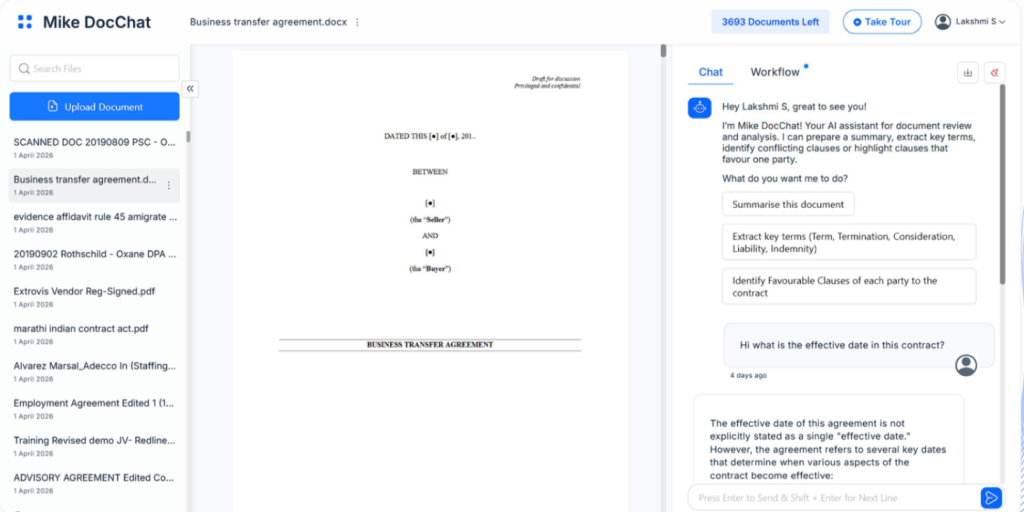
Mike DocChat document view with chat panel

Trusted by in-house teams and law firms

Most Contract Questions Are Simple.
Finding the Answer Is Not.

A colleague asks what the notice period is. The answer sits in one line of an 84-page scanned PDF, and convention means someone has to find it.

01

Scans Defeat Search

A large share of executed contracts live as scanned PDFs. Ordinary search returns nothing on those files.

02

Reading Is the Fallback

Without search, someone opens the agreement and reads until the clause appears, on every single question.

03

Extraction Happens by Hand

Pulling parties, dates, values and terms into a sheet is data entry that scales badly across a portfolio.

What Mike DocChat does

Ask, Summarise, Extract: Every Answer Traced to the Clause

Contextual questions

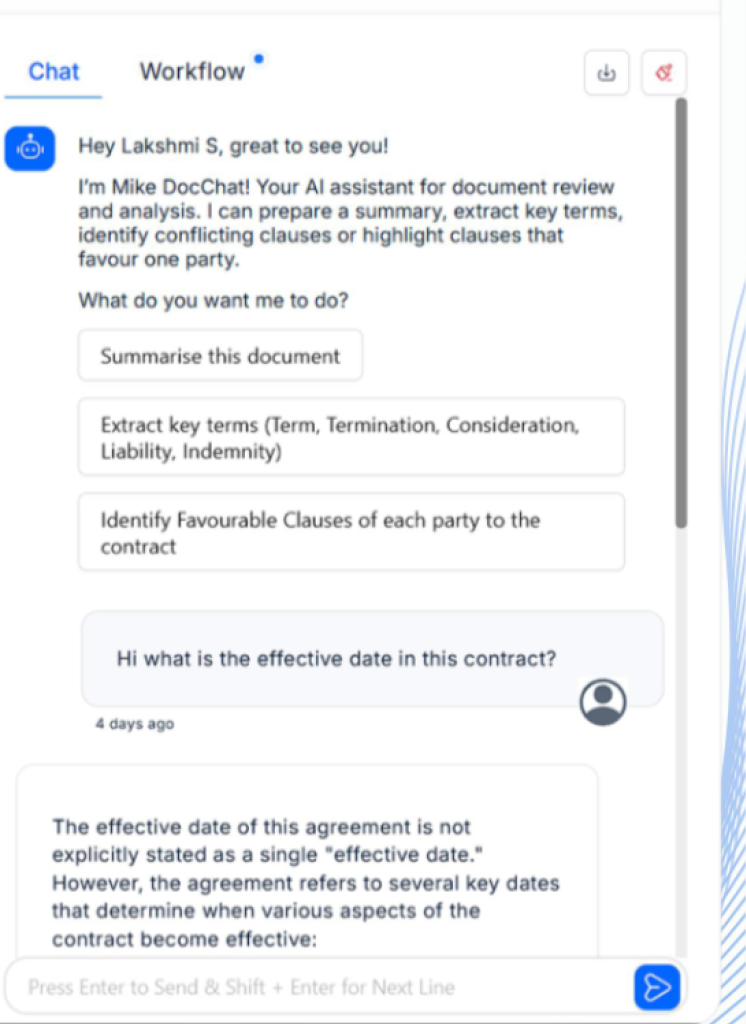
Ask a Question in Plain Language, Get a Cited Answer

Put the question the way you would ask a colleague. DocChat answers from the document itself and points at the clause it drew from.

✓ Plain-language questions and follow-ups in context

✓ Answers cited to clause level for review

✓ Conflicting or one-sided clauses flagged on request

DocChat chat panel with suggested questions
Try a question
Business Transfer Agreement · 84 Pages
Scanned PDF, parsed and indexed. Pick a question the way a reviewer would.
What is the termination notice period?
Illustrative responses. In a demo we run this live on your own document.
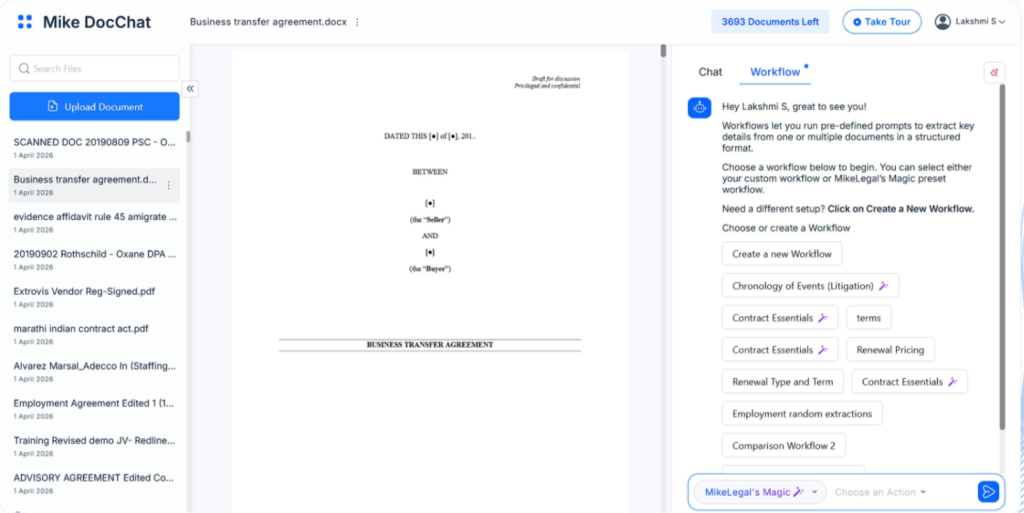
DocChat workflow panel with extraction fields

Workflows and extraction

Run Your Own Workflows Across a Batch of Documents

Save the prompts and fields your team actually tracks as a workflow, then run it on one document or 300.

✓ Custom field sets, reusable across document types

✓ Structured output, ready for review or export

Summaries for Non-Lawyers

Turn an 84-page agreement into a structured brief covering term, consideration, liability and exit.

Favourable Clause Check

Identify clauses that favour one party and conflicts between clauses, before the draft is signed.

Multi-Document Questions

Upload up to 300 documents and ask one question across the set instead of file by file.

File Types Supported

Word, PDF or a scanned PDF: Mike DocChat works on all three file types, including the ones where conventional search methods sometimes fail.

DOCX
Word
Full text and structure, best for drafts in negotiation
PDF
PDF
Text-layer files parsed directly
SCAN
Scanned documents
Read and indexed, the case where ordinary search returns nothing

Set-Up and Access

Nothing to install. DocChat runs in all major browsers, and each upload now supports up to 300 documents of 100 MB each.

BrowsersChrome · Edge · Firefox · Safari
Maximum file size100 MB
Documents per upload300
InstallationNone, browser based
Works insideMike CLM repository
Step 1
Schedule a demo and get login details
Step 2
Log in from your browser
Step 3
Upload documents and start asking

What Legal Teams Say

“An essential toolkit for every in-house lawyer reviewing contracts. It is easy and intuitive to use, and it addresses typical issues faced in proofreading documents.”

Ganesh Parameswaran
Ganesh Parameswaran
General Counsel, Asia, Africa & Group Supply Chain, BIC

“We are extremely happy not just with the product but also the guidance at each step. It has helped us save time and reduced our error margin to negligible levels.”

Radhika Balo
Radhika Balo
Managing Partner, JCSS

“Generating results in one click and sorting them in numerous ways is a big advantage. It removes the worry of catering to different client reporting needs.”

Vani Tyagi
Vani Tyagi
Associate, Mettle Legal

Bring Your Hardest Document to the Demo

Send across the 84-page scan nobody wants to open. In 30 minutes we upload it, ask it questions live, run an extraction and set up a workflow for the fields your team tracks.

✓ 30 minutes, run on your own documents

✓ Workflow set up for the fields your team tracks

✓ Pricing for your team size, no obligation

Request a Demo

All fields are required unless marked optional.

By submitting this form you agree to be contacted about Mike DocChat. Documents shared for a demo are deleted on request.

Frequently Asked Questions

How does Mike DocChat handle scanned documents?

−

Scanned PDFs are read and indexed, so questions, summaries and extractions work on them the same way they do on text-layer files.

Can Mike DocChat's answers be verified?

+

Yes. Every answer points to the clause it was drawn from, so a reviewer can check the source in one click.

What is a workflow in Mike DocChat?

+

A saved set of prompts and fields your team tracks. Run it on one document or a batch of up to 300 and get structured output.

Does Mike DocChat work on contracts already stored in Mike CLM?

+

Yes. DocChat works inside the Mike CLM repository, so signed contracts can be questioned without downloading them first.

How does Mike DocChat handle documents and data?

+

Uploads are encrypted and private to your team. Each demo document is deleted after the session unless you ask us to keep it.

The Rest of the Mike DocSuite

Mike DocReview

Catch definition, reference, number and formatting errors before a draft goes out.

Mike DocCompare

Compare two versions side by side and see the changes that carry legal meaning.

Mike CLM

Store signed contracts, track obligations and renewals and handle e-signing.

Get a Quote for Your Team
Pricing is based on team size and document volume.
Schedule A Free Demo →