MikeLegal, Your AI powered Legal Associate
IP SolutionsContract SolutionsLitigation SolutionsAbout UsResourcesRequest Demo

Your AI powered Legal Associate

Litigation Case Work, Streamlined and Automated

Mike Litigator tracks every matter across 10,000+ courts, breaks it into assigned tasks and pushes every hearing, notice and deadline to the people who own it.

Never miss a critical updateDelegate and track with clarity

Trusted by 3500+ lawyers · in-house teams and law firms across India

Dashboard

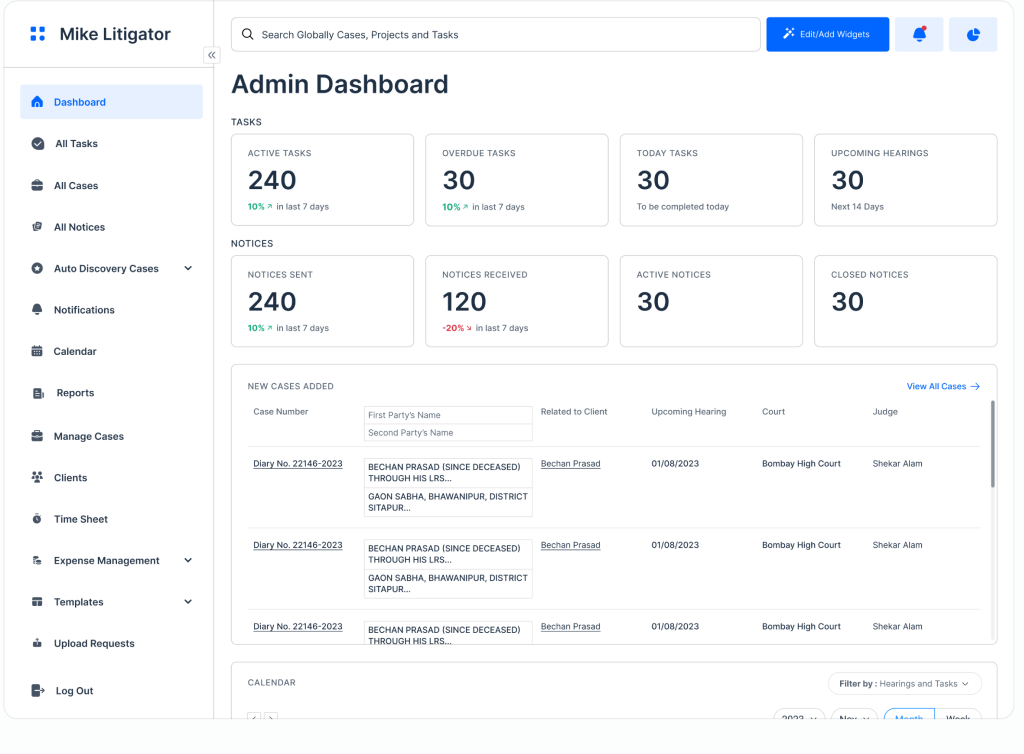
Hearings, tasks and notices at a glance

Mike Litigator admin dashboard with hearings, tasks and notices

All Cases

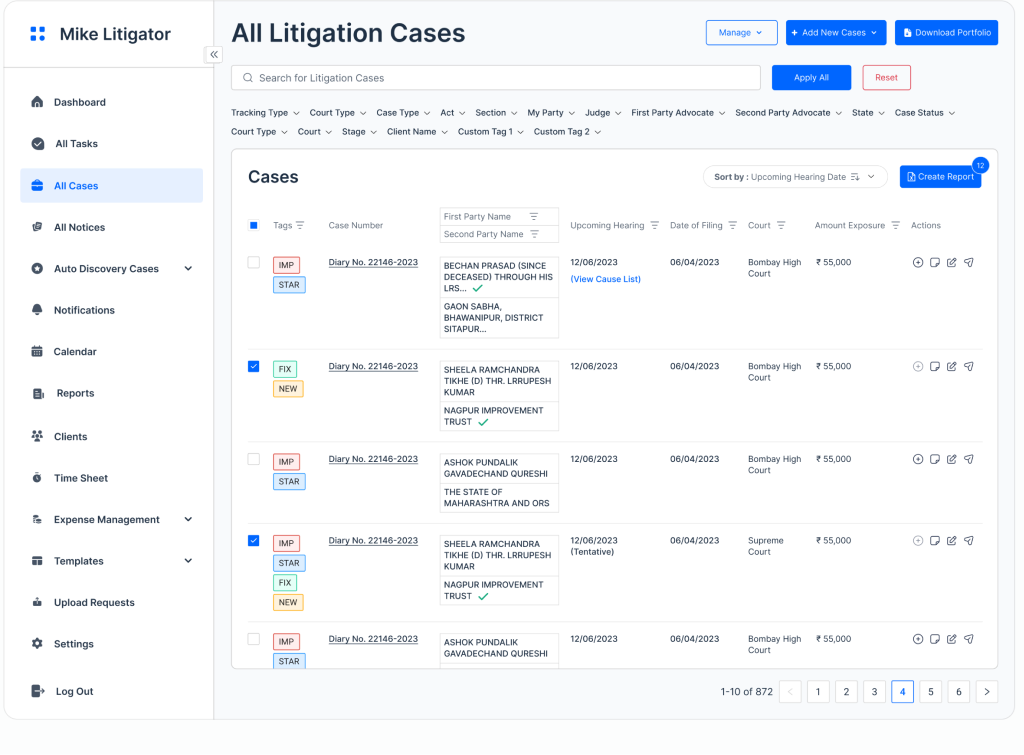
Every matter across 10,000+ courts

Mike Litigator all litigation cases table

Hearing Calendar

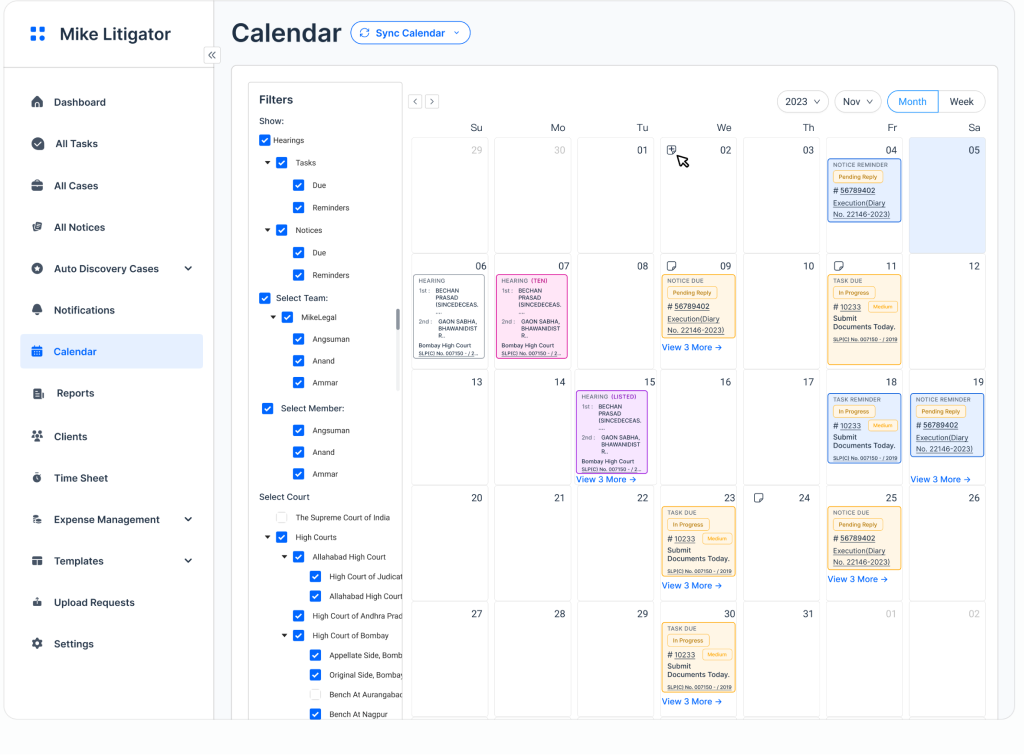
Deadlines and hearing dates in one view

Mike Litigator monthly calendar with hearings

Notices

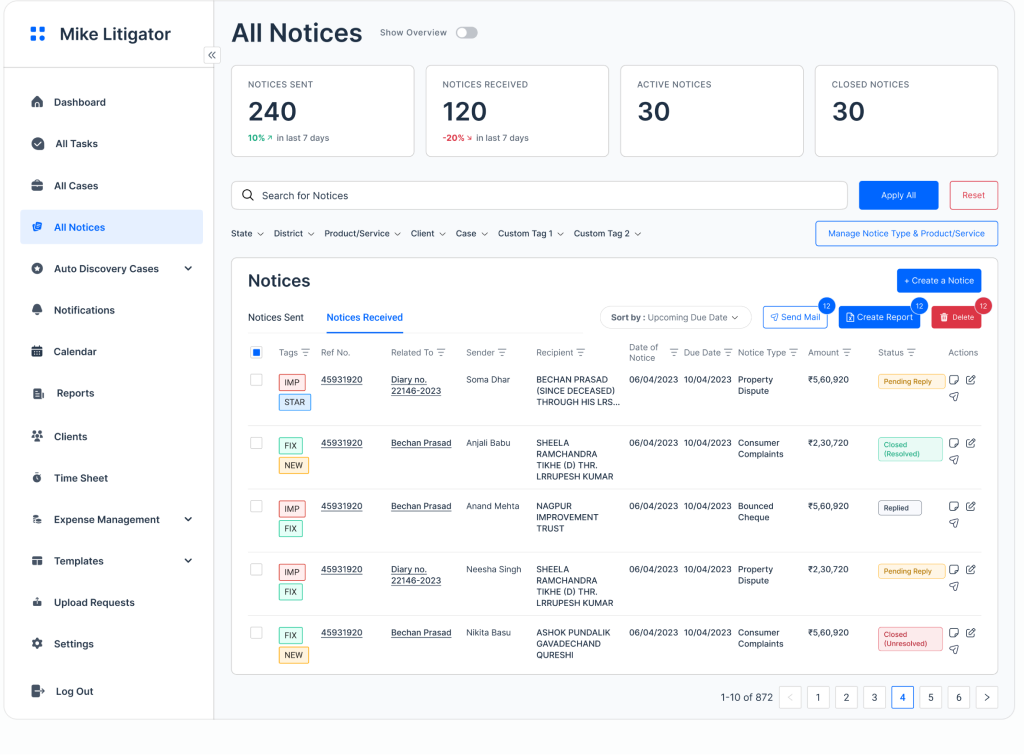
Every notice sent or received, tracked

Mike Litigator notices register

The LegalTech company trusted by 3500+ lawyers

One product, eight modules

The Whole Litigation Workflow, In One Workspace

From the first hearing to the final invoice, every part of a matter lives in Mike Litigator. Here is exactly what your team sees on day one.

01 · Admin dashboard

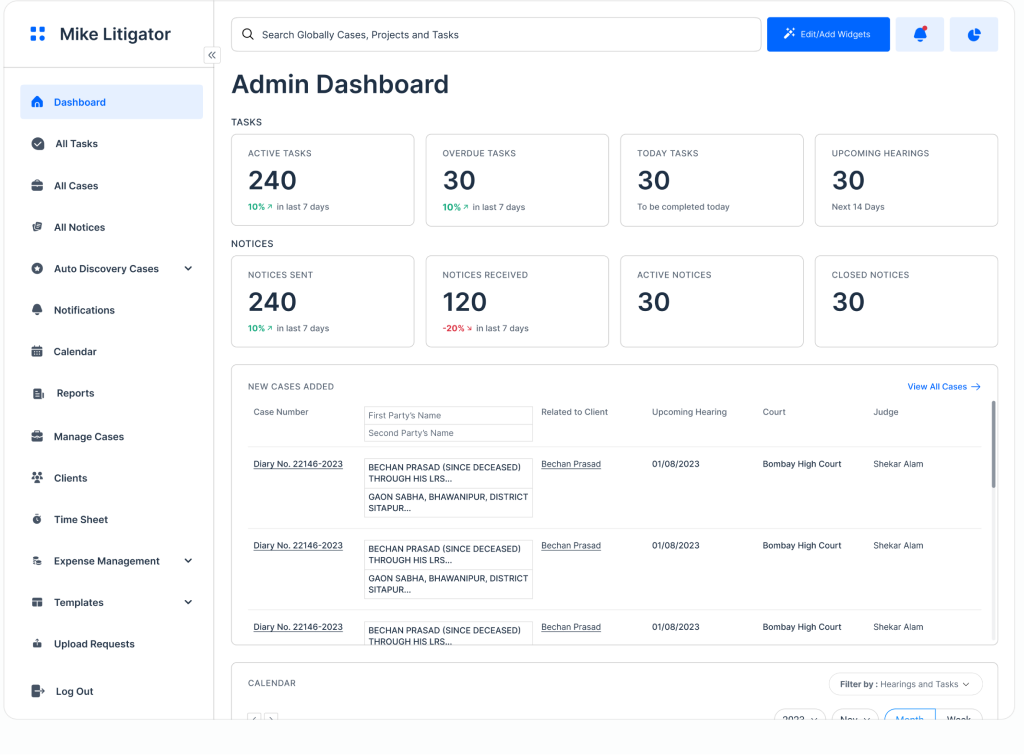
View Work From a Bird's-Eye View Across All Matters

Active, overdue and today's tasks sit next to upcoming hearings and the full notices picture, so partners see the state of the practice without opening a single file.

✓ Active, overdue & today's tasks

✓ Upcoming hearings, next 14 days

✓ Notices sent, received, active, closed

✓ Global search & editable widgets

Mike Litigator admin dashboard with tasks and hearings
Mike Litigator task list with statuses

02 · Task management

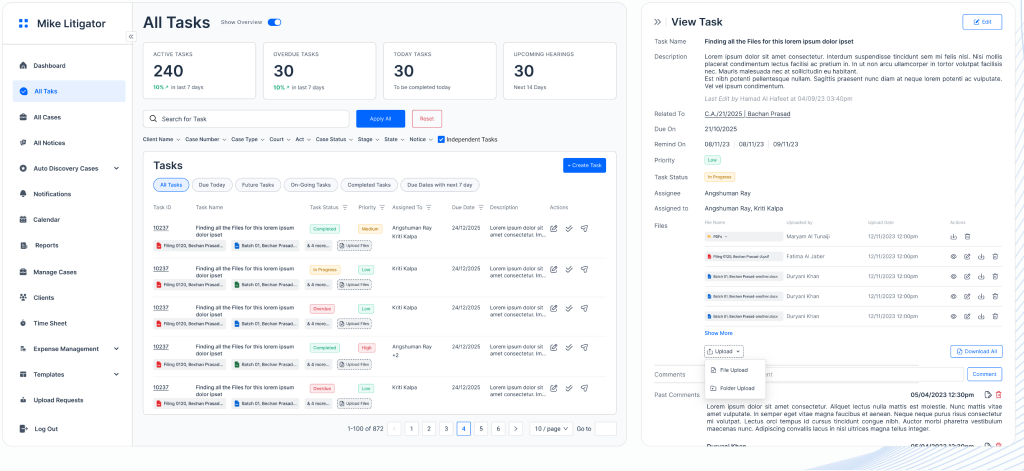
Break Complex Matters Into Manageable Tasks With Clear Assignments and Deadlines

Split a matter into tasks with owners, priorities, due dates and reminders. Attach filings, leave comments and track status from a filterable list so nothing sits unassigned.

✓ Assignees, priority, due dates

✓ Up to 3 reminders per task

✓ Files & comment threads

✓ Case-linked or independent tasks

03 · Case tracking

Access All Your Cases Across 10,000+ Courts

Every matter with its upcoming hearing, filing date, court, judge and amount exposure. Filter on dozens of fields, apply custom tags and export a report or the full portfolio in a click.

✓ Supreme Court to district courts

✓ Sort by upcoming hearing date

✓ Custom tags & saved filters

✓ Amount exposure & portfolio export

Mike Litigator all litigation cases table
Mike Litigator notices register

04 · Legal notices

Manage All Legal Notices - Whether Sent or Received

One register for both sides of every notice, with sender, recipient, type, amount, due date and status. Send mail, create reports and track replies without leaving the tool.

✓ Pending reply, replied, closed

✓ Due dates & amounts tracked

✓ Send mail & create reports

✓ Custom notice types & tags

05 · Auto case discovery

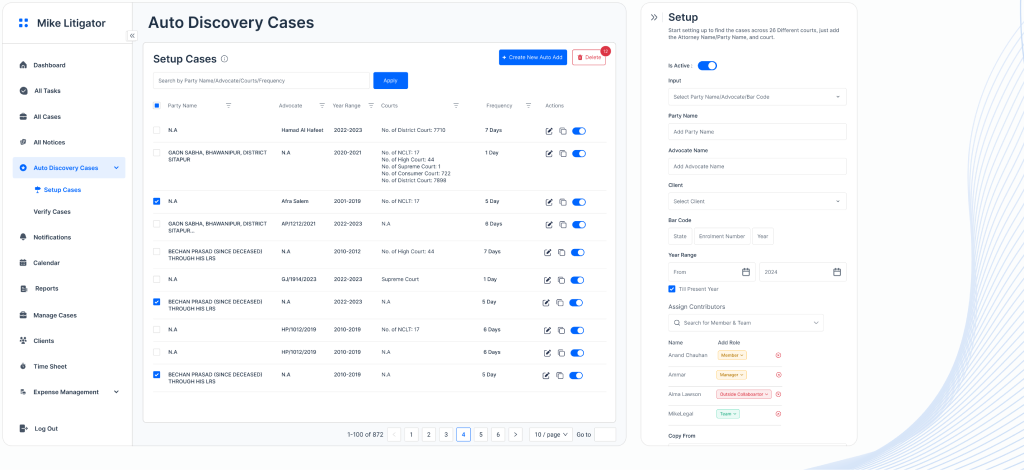
Simply Input a Company or Attorney Name and Get Automatic Updates of Any Case Filed by or Against Them

Add a party name, advocate name and court, and Mike Litigator finds matters across 26 different courts - then keeps checking on the frequency you set, so a new filing never takes you by surprise.

✓ Party, advocate or bar-code input

✓ Year range & check frequency

✓ Assign contributors and roles

✓ Verify before adding to portfolio

Mike Litigator auto discovery case setup

06 · Calendar

Deadlines and Hearing Dates on Your Fingertips

Hearings, task due dates, reminders and notice deadlines on a single colour-coded calendar, filterable by team, member and court and syncable to the calendar you already use.

✓ Hearings, tasks & notices together

✓ Month and week views

✓ Filter by team, member, court

✓ Sync to your external calendar

Mike Litigator monthly calendar with hearings
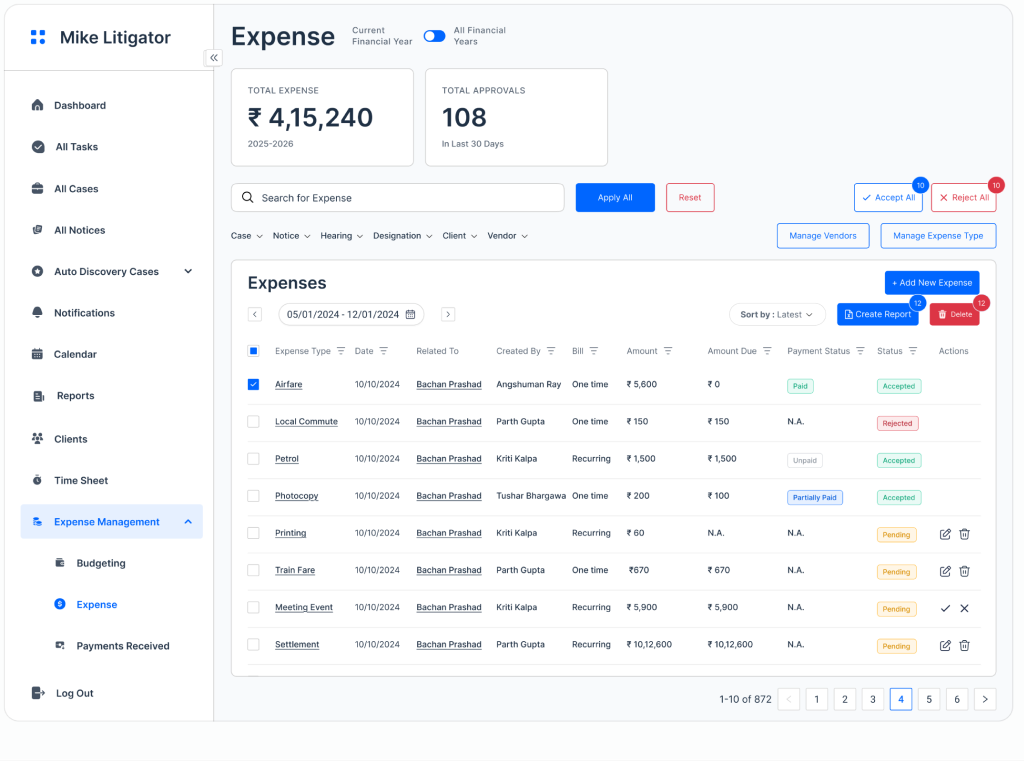
Mike Litigator expense module with totals

07 · Expenses & budgeting

Track Spending for Each Matter and Address Overruns Long Before They Happen

See spend per matter and per client, set budgets, and approve or reject in bulk. Manage vendors and expense types, and record payments received against every case.

✓ Budgeting per case & client

✓ One-time & recurring expenses

✓ Bulk accept or reject approvals

✓ Payments received & time sheets

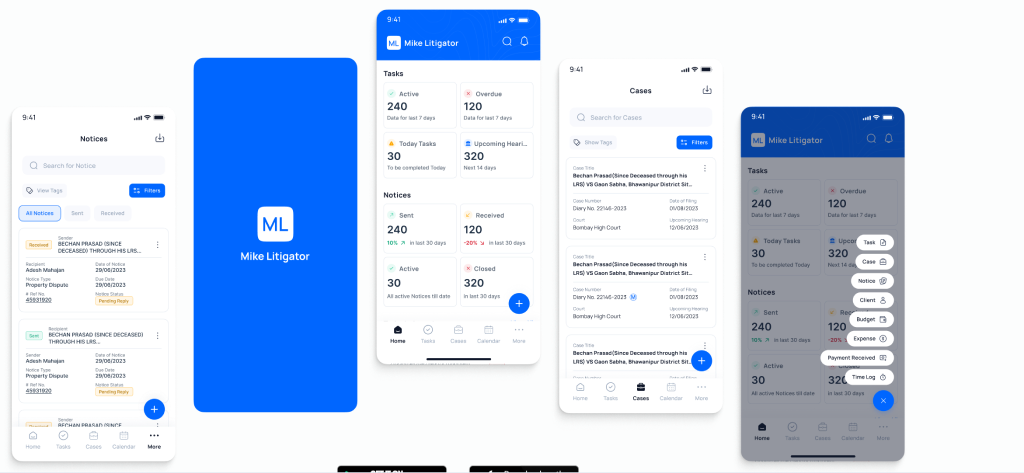
08 · Mobile apps

Mike Litigator on the Go

Real-time notifications on task assignments, status changes and deadlines, straight to the phone. View assigned tasks, add new ones or mark them complete from anywhere, on iOS and Android.

Google Play

App Store

Synced with the web app

Mike Litigator mobile app screens on Android and iOS

10,000+

courts covered for case tracking

26

courts scanned by auto discovery

3500+

lawyers already on MikeLegal

0

learning curve to get started

Why teams switch

Built With Litigators, Not Just for Them

Zero Learning Curve

Teams move over from email and spreadsheets without a lengthy onboarding. Data migration is handled for you.

Nothing Slips

Court updates, hearing dates, notice deadlines and task reminders all land in one place - and on the phone.

One Platform, Three Practices

Litigation, contracts and IP share the same workspace, so a matter never has to be re-entered twice.

"Every hearing, task and notice for the whole team finally sits in one dashboard. We stopped chasing status over email within the first week."

Litigation partner, mid-size firm · Mumbai

Connect With Us to Schedule a Free Demo

Book a 30-minute call and we will pull your own cases from the courts that matter, then walk through the dashboard, tasks, notices and auto discovery live.

1 A 30-minute walkthrough on your own docket

2 A migration plan for your existing case list

3 Pricing for your team size - no obligation

Request a Demo

Fill out the form and our team will reach out within 24 hours.

Questions

Frequently Asked Questions

How many courts does Mike Litigator cover?

−

Case tracking covers 10,000+ courts, from the Supreme Court to district courts. Auto case discovery scans 26 courts for matters filed by or against a party.

How does auto case discovery work?

+

Enter a party name, advocate name or court, set a year range and check frequency, and Mike Litigator finds the matching cases. You verify each one before it joins your portfolio.

Is there a mobile app?

+

Yes. Mike Litigator is available on Google Play and the App Store, with real-time notifications for assignments, status changes and deadlines.

Will my team need training?

+

Most teams start working in the same week. Unlimited training sessions are included with your licence, and the team is available for a walkthrough on your own cases.

Does it work with the rest of MikeLegal?

+

Yes. Litigation, contracts and IP share one workspace, so a matter never has to be re-entered across tools.

The MikeLegal ecosystem

Explore the Rest of the Platform

Mike IP Suite

MikeTM Watch, MikeTM Search and MikeTM Manager - trademark watch, search and portfolio automation.

Explore IP →

Mike DocSuite

Mike DocReview, Mike DocCompare, Mike DocChat and Mike CLM - storage, analysis, review and proofreading.

Explore contracts →

Mike Litigator

You are here - case tracking, tasks, notices, auto discovery, calendar, expenses and mobile apps.

Book a demo →