MikeLegal, Your AI powered Legal Associate
IP SolutionsContract SolutionsLitigation SolutionsAbout UsResourcesRequest Demo

MS Word Add-in

Proofread Contracts 70% Faster, Without Leaving Word

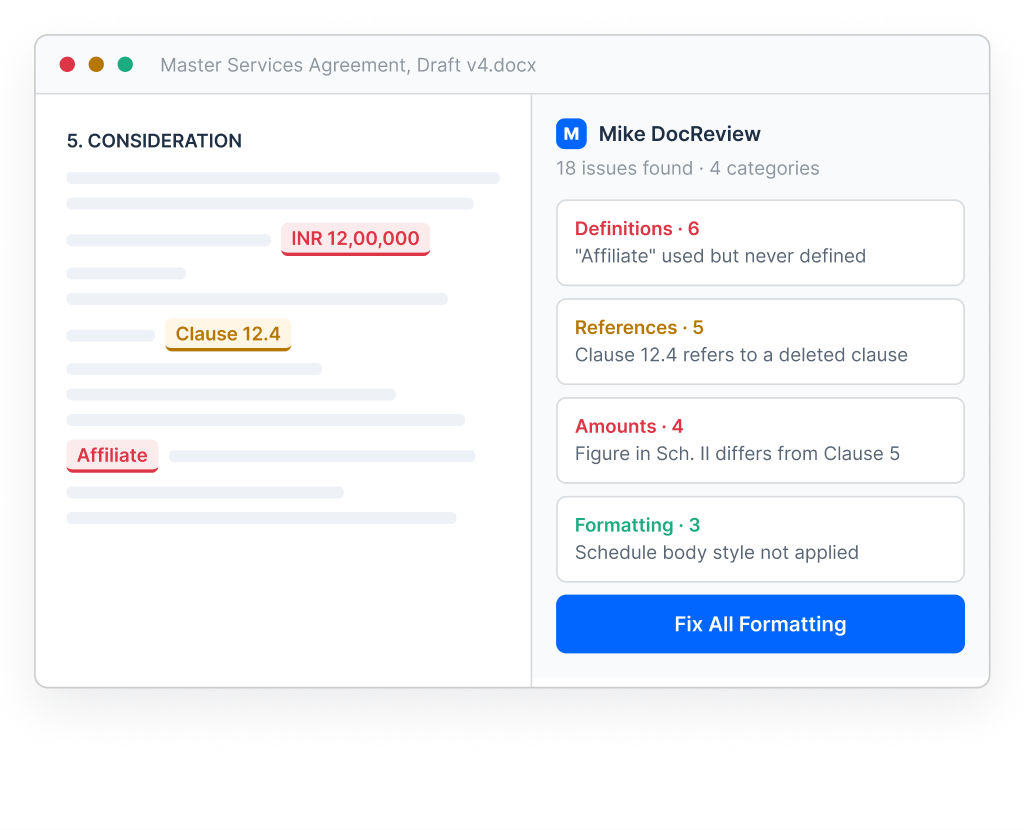
Mike DocReview runs a full technical pass over any draft in seconds — definitions, clause references, amounts and formatting and fixes what it finds in a single click.

✓ Works inside MS Word

Mike DocReview running in Word: draft with flagged definitions, references and amounts

Trusted by 3500+ lawyers worldwide

70%

Faster proofreading on every draft

3,500+

Lawyers reviewing in Word with DocReview

4

Check categories run in a single pass

WHY THIS MATTERS

The Eye Skips Exactly the Errors That Cost the Most

A draft moves through a dozen rounds of edits before it goes out. By the time a definition drifts or a cross-reference breaks, nobody remembers to check it by hand.

01

Definitions drift across rounds

Terms get defined twice, capitalised inconsistently or defined and then never used once the clause that needed them is cut.

02

References break silently

Delete a clause in round three and every cross-reference after it points somewhere else. Nothing in Word tells you.

03

Formatting eats junior hours

Matching a document to house style by hand is slow, repetitive work that clients are rarely happy to be billed for.

WHAT DOCREVIEW CHECKS

Four Checks, One Pass

Upload a draft and DocReview returns a categorised issue list you can work through clause by clause.

See it on your own draft →
Playbook
Detect Deviations From Your Standard Clauses
Set your standard position for any clause once, then flag any draft that deviates from it before it reaches negotiation.
Limitation of Liability caps below firm standardDeviation
Indemnity clause matches firm playbookClear
Confidentiality tail shorter than standard 3 yearsReview
Mike DocTrack
Read Track Changes By Person, Date Or Clause
Filter every edit made in track mode, see which clauses were touched and get an overview of the whole agreement before you respond.
A. Mehta · 14Counterparty · 22Last 7 Days
Clause 8, Termination6 Edits
Clause 11, Governing LawAccepted

The Difference

Manual Proofing Versus Mike DocReview

The same review, minus the afternoon. Every check runs across the whole document at once and the fixes apply in place.

Task

Current Way

DocReview

Check every definition

Manual read

Seconds

Verify clause references

Clause by clause

One pass

Reconcile amounts

Spot check

All values

Apply house style

Junior hours

One click

Read track changes by person

Possible, but read the entire document

Filtered

HOW IT WORKS

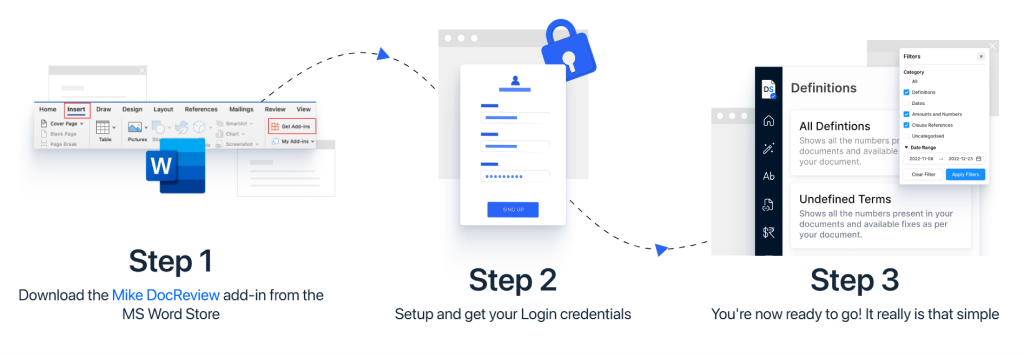
Installed In Minutes, No Change To How The Team Drafts

Mike DocReview installed in Word with the review panel

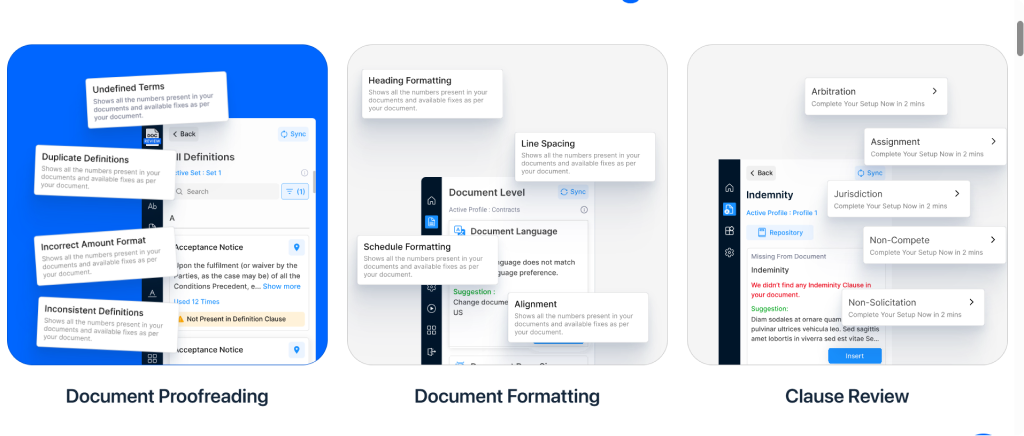
Inside the add-in

See Mike DocReview In Action

Mike DocReview running inside Microsoft Word with the issues panel

Loved By Legal Teams. Backed By Real Results.

From boutique law firms to Fortune 500 in-house teams, Mike DocReview is trusted across the board.

"We have started our foray into LegalTech with MikeLegal and are extremely happy not just with their product but also the guidance at each step. Mike DocReview has helped us save time and reduced error margin to negligible levels."

Radhika Balo

Radhika Balo

Managing Partner, JCSS

"Generating results in both Excel and PDF format in one click and sorting them in numerous ways is a big advantage. It does away with the worry of catering to a client's need to see reports in different ways."

Shiv Rudra

Shiv Rudra

Partner, Crawford Bayley & Co.

"Mike DocReview is an essential toolkit for every in-house lawyer reviewing contracts. It is easy and intuitive to use and addresses typical issues faced in proofreading documents. I am a proud supporter of this tool."

Ganesh Parameswaran

Ganesh Parameswaran

General Counsel, Asia, Africa & Group Supply Chain, BIC

We Do Not Snoop, Save Or Share Your Data. That Is A Promise.

SOC 2 AlignedISO 9001 CertifiedAstra PentestedIAF Accredited
Questions

Frequently Asked Questions

Anything not covered here, the team can walk through on the demo call.

Does DocReview work with my version of Word?+

Mike DocReview installs as a Word add-in on Windows and Mac. The team confirms compatibility for your setup before rollout.

Does it change the document automatically?+

Issue detection is advisory: each flagged item is reviewed and accepted by you. Formatting is the one action DocReview applies directly and only against a saved profile you run.

Can different formatting profiles be saved per client?+

Yes. Save a profile per template or per client: font family, size, text format and style for heading, sub-heading, main agreement and schedule body, then apply the right one before the draft goes out.

How does this relate to Mike DocCompare?+

DocReview checks a single document for internal errors. DocCompare shows what changed between two versions. Teams generally run DocReview before sending and DocCompare when a version comes back.

How is document data handled?+

Documents are processed on MikeLegal secure infrastructure with access controls at the workspace level. Your IT reviewers can be walked through the full security posture during the demo.

Rest Of The Suite

What Comes Next In The Contract Workflow

Stage 02

Mike DocCompare

Compare two versions side by side and see only the changes that carry legal meaning.

Explore Product
Stage 03

Mike DocChat

Ask any contract a question and get a cited answer, on Word, PDF or scanned PDF.

Explore Product
Stage 04

Mike CLM

Store signed contracts, track obligations and renewals, and handle e-signing.

Explore Product
KNOWLEDGE CENTRE

Latest Blogs

View all blogs →
📄

How automated journal watch prevents costly infringements

8 min read • IP Watch
🔎

A practical guide to clearing a mark across 45 classes

6 min read • IP Search

Case Studies

View all cases →

Cutting weekly journal review time by more than half

A research practice automates watch across 45 classes.
60%
Time saved

Faster client service and higher profitability

MikeLegal search helps a top law firm deliver more in less time.
40%
Increase in efficiency

Book A Free Demo Of Mike DocReview

See how Mike DocReview can save your team hundreds of hours a month. Schedule a personalised walkthrough on your own draft, or get team pricing.

team@mikelegal.com+91 99589 15302Follow us on LinkedIn
Request A Demo
Fill out the form and our team will reach out within 24 hours.