Mike DocCompare
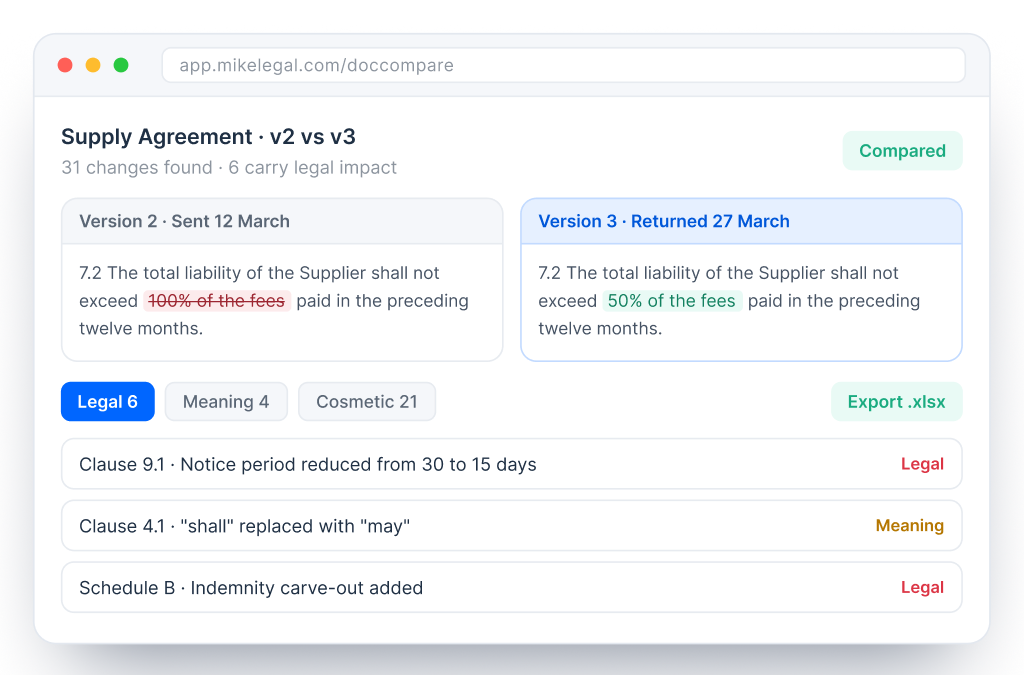
A word compare flags every character that moved. DocCompare reads the two versions in context and flags the deviations that actually change the deal.
5,000+
Lawyers
1 Click
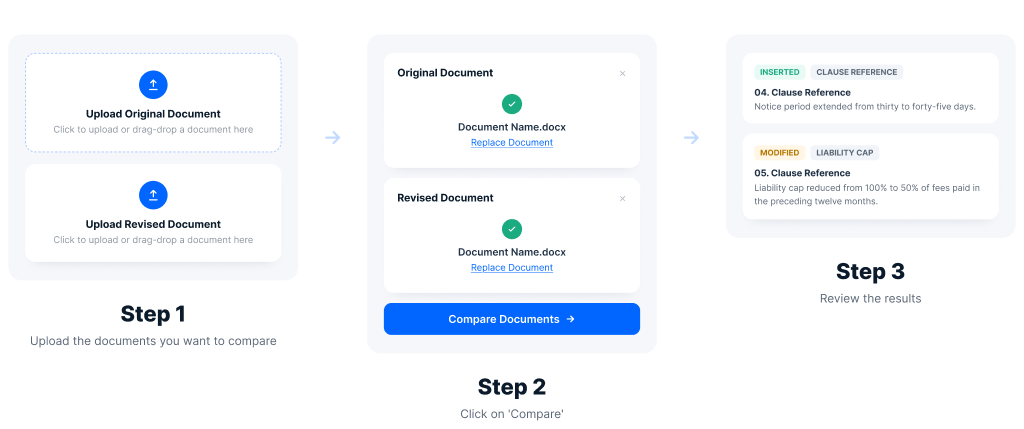
Two drafts to a change list
Excel
Export for every negotiation

Trusted by 3500+ lawyers worldwide
Why This Matters
A standard word-by-word compare treats a comma and a liability cap the same way. Someone still has to read every flagged word and decide which ones carry legal weight, on every round, under time pressure.
1
Word-by-Word Compare Misses Context
A rewritten clause that keeps the same obligation reads as a wall of red. A one-word change that shifts liability reads the same as a typo fix.
2
Volume Buries the Important Edits
Thirty formatting and phrasing differences around three substantive changes is how a shifted indemnity slips through unnoticed.
3
The Record is Hard to Share
Business stakeholders want a summary of what changed, and a marked-up Word file rarely serves that purpose.
What DocCompare Does
Comparison
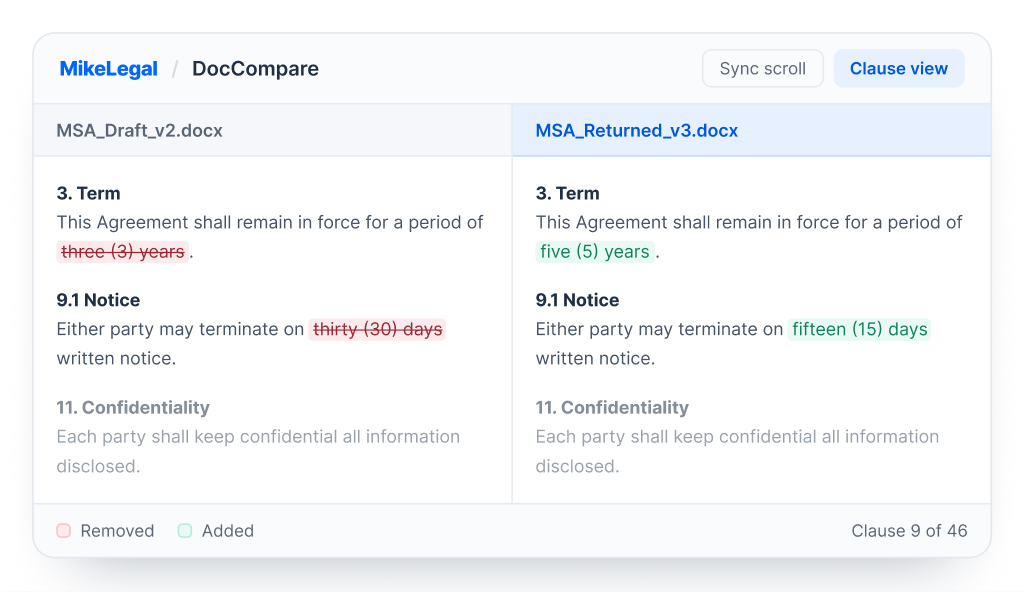
Any two versions of a document, aligned clause by clause
Load both versions and DocCompare aligns them clause by clause, reading each pair in context rather than matching word by word, so a rephrased sentence with the same meaning is not flagged as noise.
✓ Works on clean copies, no tracked changes needed
✓ Clause-level alignment across schedules
✓ Word, PDF and scanned PDF supported


Deviations that shift obligations, not just words
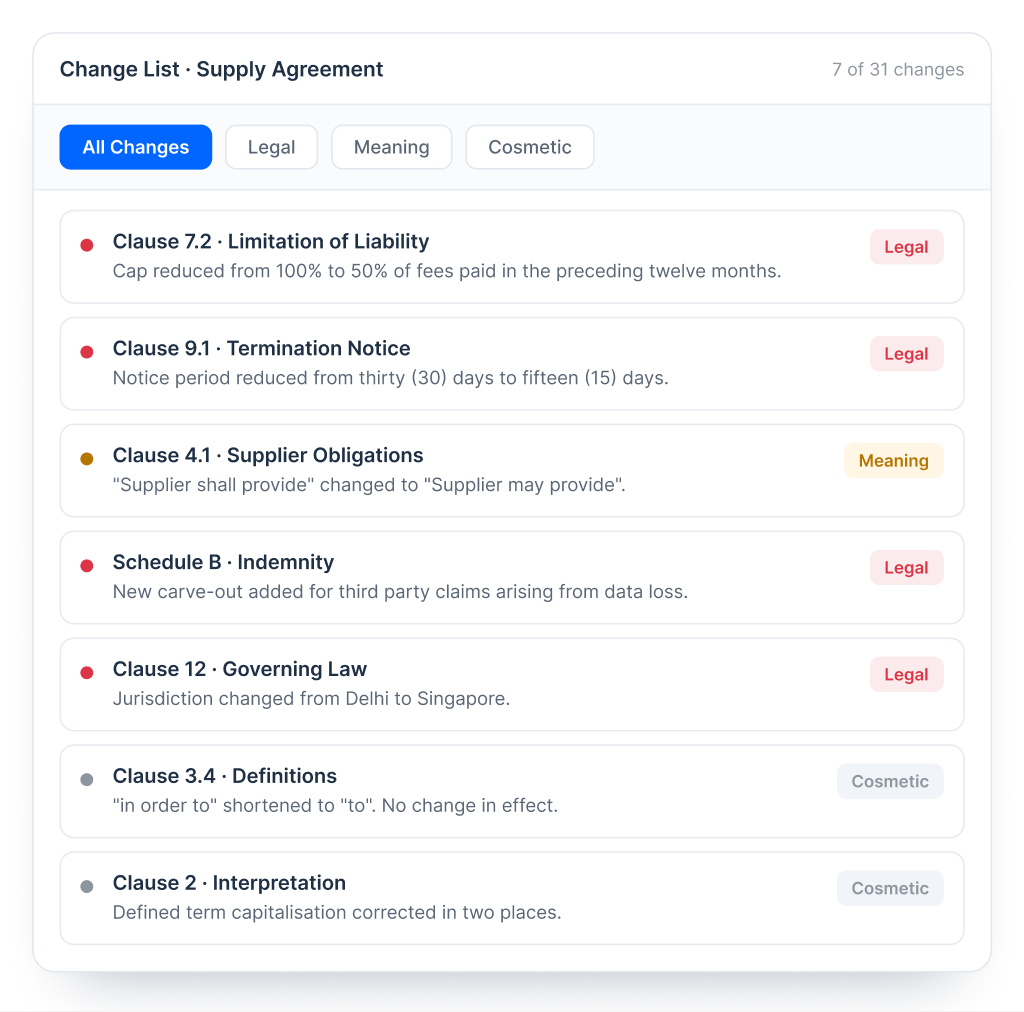
Unlike a word compare, DocCompare understands what a clause means in both versions and flags it only when that meaning has actually deviated, so the substantive changes surface first and the review starts where the risk is. Try the filters on the left.
✓ Obligation and liability shifts flagged
✓ Additions and deletions across schedules
✓ Modal verb changes surfaced
✓ Cosmetic edits separated out
Output
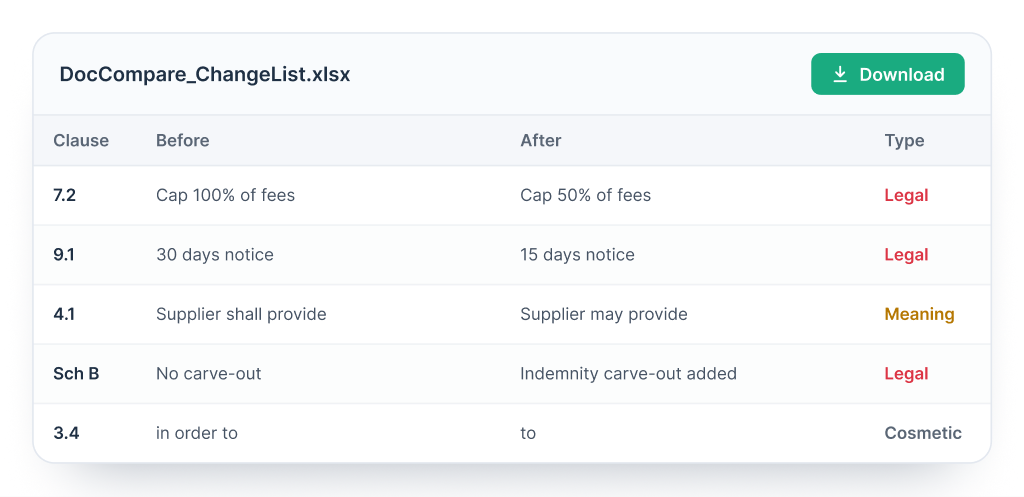
Narrow the change list to what you care about, then export it. The Excel output gives business teams and clients a readable record of every movement between rounds.
A change list your stakeholders can read
✓ Filter by change type
✓ Filter by section or schedule
✓ Export the filtered list to Excel
✓ Shareable negotiation record

How it Works

From boutique firms to Fortune 500 in-house teams, MikeLegal supports contract review across the board.
"Mike DocReview is an essential toolkit for every in-house lawyer reviewing contracts. It's easy and intuitive to use. I compliment the team for building a great tool that addresses typical issues faced in proofreading documents."

Ganesh Parameswaran
General Counsel, Asia, Africa & Group Supply Chain
"We have started our foray into LegalTech with MikeLegal and are extremely happy not just with their product but also the guidance at each step. Mike DocReview has helped us save time and reduced error margin to negligible levels."

Radhika Balo
Managing Partner, JCSS Law
"The feature of generating results in both Excel and PDF format in one click and allowing sorting of the results into numerous ways is a big advantage, doing away with the worry of catering to client's needs to see reports in different ways."

Vani Tyagi
Associate, Mettle Legal
SOC 2 Type II
ISO 9001 Certified
Penetration Tested
IAF Accredited
Rest of the Suite
Before the Draft Goes Out
Mike DocReview
Catch definition, reference, number and formatting errors before a draft goes out.
Explore Mike DocReviewQuestion Any Contract
Mike DocChat
Ask any contract a question and get a cited answer, on Word, PDF or scanned PDF.
Explore Mike DocChatAfter Signature
Mike CLM
Store signed contracts, track obligations and renewals and handle e-signing.
Explore Mike CLMBring a live negotiation to the call. We will run the comparison on your own two versions and export the change list with you.
30 min
walkthrough on your documents
24 hrs
response from the team
Questions
How is this different from a Word compare?
A Word compare flags every character that moved. DocCompare reads the two versions in context and flags only the deviations that change the meaning of a clause.
What counts as a contextual deviation?
Any change that shifts an obligation, a liability, a deadline or a right, such as a reduced notice period or a narrower cap, is flagged as legal. Changes to wording with the same effect are marked as meaning or cosmetic.
Can we compare more than two versions?
Yes. Load each round of a negotiation and compare any two versions in the set, so the full history of a contract can be reviewed.
What does the Excel export contain?
Each change with its clause reference, the before and after wording and its type (legal, meaning or cosmetic), ready to share with business teams and clients.
How does this work with DocReview?
DocReview checks a single draft for errors in definitions, references, numbers and formatting. DocCompare compares two versions to show what changed between them. Use DocReview before you send, and DocCompare when a reply comes back.